Part 1. a few CSS styles: <\/b><\/p>\n\r\n <style>\r\n.camcontent{\r\n display: block;\r\n position: relative;\r\n overflow: hidden;\r\n height: 480px;\r\n margin: auto;\r\n }\r\n.cambuttons button {\r\n border-radius: 15px;\r\n font-size: 18px;\r\n }\r\n.cambuttons button:hover {\r\n cursor: pointer;\r\n border-radius: 15px;\r\n background: #00dd00 ; \/* green *\/ \r\n }\r\n <\/style>\r\n<\/pre>\n <\/p>\n
\n Part 2. the Javascript and HTML5: <\/b><\/p>\n
Note: A small google script is used to avoid “reinventing the wheel”. <\/p>\n
\r\n<script src=\"\/\/ajax.googleapis.com\/ajax\/libs\/jquery\/1.8.3\/jquery.min.js\"><\/script>\r\n<script>\r\n \/\/ Put event listeners into place\r\n window.addEventListener(\"DOMContentLoaded\", function() {\r\n \/\/ Grab elements, create settings, etc.\r\n var canvas = document.getElementById(\"canvas\"),\r\n context = canvas.getContext(\"2d\"),\r\n video = document.getElementById(\"video\"),\r\n videoObj = { \"video\": true },\r\n image_format= \"jpeg\",\r\n jpeg_quality= 85,\r\n errBack = function(error) {\r\n console.log(\"Video capture error: \", error.code); \r\n };\r\n\r\n\r\n \/\/ Put video listeners into place\r\n if(navigator.getUserMedia) { \/\/ Standard\r\n navigator.getUserMedia(videoObj, function(stream) {\r\n video.src = stream;\r\n video.play();\r\n $(\"#snap\").show();\r\n }, errBack);\r\n } else if(navigator.webkitGetUserMedia) { \/\/ WebKit-prefixed\r\n navigator.webkitGetUserMedia(videoObj, function(stream){\r\n video.src = window.webkitURL.createObjectURL(stream);\r\n video.play();\r\n $(\"#snap\").show();\r\n }, errBack);\r\n } else if(navigator.mozGetUserMedia) { \/\/ moz-prefixed\r\n navigator.mozGetUserMedia(videoObj, function(stream){\r\n video.src = window.URL.createObjectURL(stream);\r\n video.play();\r\n $(\"#snap\").show();\r\n }, errBack);\r\n }\r\n \/\/ video.play(); these 2 lines must be repeated above 3 times\r\n \/\/ $(\"#snap\").show(); rather than here once, to keep \"capture\" hidden\r\n \/\/ until after the webcam has been activated. \r\n\r\n \/\/ Get-Save Snapshot - image \r\n document.getElementById(\"snap\").addEventListener(\"click\", function() {\r\n context.drawImage(video, 0, 0, 640, 480);\r\n \/\/ the fade only works on firefox?\r\n $(\"#video\").fadeOut(\"slow\");\r\n $(\"#canvas\").fadeIn(\"slow\");\r\n $(\"#snap\").hide();\r\n $(\"#reset\").show();\r\n $(\"#upload\").show();\r\n });\r\n \/\/ reset - clear - to Capture New Photo\r\n document.getElementById(\"reset\").addEventListener(\"click\", function() {\r\n $(\"#video\").fadeIn(\"slow\");\r\n $(\"#canvas\").fadeOut(\"slow\");\r\n $(\"#snap\").show();\r\n $(\"#reset\").hide();\r\n $(\"#upload\").hide();\r\n });\r\n \/\/ Upload image to sever \r\n document.getElementById(\"upload\").addEventListener(\"click\", function(){\r\n var dataUrl = canvas.toDataURL(\"image\/jpeg\", 0.85);\r\n $(\"#uploading\").show();\r\n $.ajax({\r\n type: \"POST\",\r\n url: \"html5-webcam-save.php\",\r\n data: { \r\n imgBase64: dataUrl,\r\n user: \"Joe\", * <\/span>\r\n userid: 25 * <\/span>\r\n }\r\n }).done(function(msg) {\r\n console.log(\"saved\");\r\n $(\"#uploading\").hide();\r\n $(\"#uploaded\").show();\r\n });\r\n });\r\n }, false);\r\n\r\n <\/script>\r\n\r\n\r\n<div class=\"camcontent\">\r\n <video id=\"video\" autoplay><\/video>\r\n <canvas id=\"canvas\" width=\"640\" height=\"480\"><\/canvas>\r\n<\/div>\r\n<div class=\"cambuttons\">\r\n <button id=\"snap\" style=\"display:none;\"> Capture <\/button> \r\n <button id=\"reset\" style=\"display:none;\"> Reset <\/button> \r\n <button id=\"upload\" style=\"display:none;\"> Upload <\/button> \r\n <br> <span id=uploading style=\"display:none;\"> Uploading has begun . . . <\/span> \r\n <span id=uploaded style=\"display:none;\"> Success, your photo has been uploaded! \r\n <a href=\"javascript:history.go(-1)\"> Return <\/a> <\/span> \r\n <\/div>\r\n<\/pre>\nAbove, there are 2 or 3 lines which you may need to change to fit your situation:
\n (of course, you can change a lot – especially the css and html) <\/em><\/p>\n1. the name of the program ajax calls and sends the image and other data to is named “html5-webcam-save.php” in this example and the example code for it is in “Part 3.” below. Realize that the name of your program is arbitrary and if you write programs using another language (not php), that is your option also. <\/p>\n
2. in addition, you can send other information along with the image.
\n “imgBase64: dataUrl”
\nis required but the examples * <\/span>
\n user: “Joe”,
\n userid: 25
\nare not likely useful. You will want to put in variables that identify the person. like for instance:
\n userid: \"<?php echo $USER->id ; ?>\" <\/tt>
\nThis php example is one where the visitor\/user has logged in to some website program and their user-id is being stored in memory, in a variable “$USER->id”. If it is a number, the quotes are ok but not required, if it contains characters other than numbers, the quotes are required. <\/p>\n <\/p>\n
\n Part 3. the “html5-webcam-save.php”
\n to save the .jpg photo to a folder (ex: images\/) <\/em> using php: <\/b>
\nBreak up a string on the commas (“explode”), convert (decode) the jpg image, name and save the image.
\n(and maybe update a user record in your database?) <\/p>\n\r\n<?php\r\n\r\n$rawData = $_POST['imgBase64'];\r\n$filteredData = explode(',', $rawData);\r\n$unencoded = base64_decode($filteredData[1]);\r\n\r\n$datime = date(\"Y-m-d-H.i.s\", time() ) ; # - 3600*7\r\n\r\n$userid = $_POST['userid'] ;\r\n\r\n\/\/ name & save the image file \r\n$fp = fopen('images\/'.$datime.'-'.$userid.'.jpg', 'w');\r\nfwrite($fp, $unencoded);\r\nfclose($fp);\r\n\r\n \/\/ next, update or insert a users record <\/em> \r\n<\/pre>\n <\/p>\n
\n part 4. extra: How to retrieve and view the collection
\n of photos saved in the folder “images” with php <\/b><\/p>\n\r\n<?php\r\n\r\n $filelist = opendir('images') ;\r\n $photos = array();\r\n\r\n while ($campic = readdir($filelist)) \r\n {\r\n if (strpos($campic, '.jpg') !== false ) \r\n { $photos[] = $campic; }\r\n }\r\n closedir($filelist);\r\n rsort($photos); # to display the most recent photos first\r\n\r\n foreach ($photos AS $photo ) \r\n { echo ' <img width=640 height=480 src=\"images\/'.$photo.'\"> \r\n <br> '.$photo.'<br> <br> <br>' ; }\r\n\r\n<\/pre>\n <\/p>\n
<\/p>\n","protected":false},"excerpt":{"rendered":"
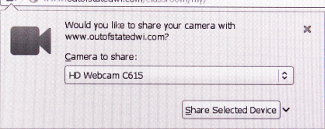
updated 2016-03-03 How to take-upload your visitors webcam photo How to upload a jpg photo on your website with your visitors webcam html5 webcam getUserMedia examples and demo How to take a jpg webcam photo with html5 One of the really cool things that has come from HTML5 is the ability to access a website visitor’s webcam and upload a snapshot through the browser – with the visitors permission. example HTML-5 webcam photo Remove Adobe Flash! “If you have Adobe Flash on your computer, and most of you do, you are probably being spied on and Adobe does their best not to let you know or do anything about it. Fundamentally, rich video content is the drug Adobe wants you to get hooked on, but make no mistake, one of the main purposes of Flash is apparently to secretly compromise your security. … Flash has been riddled with exploitable vulnerabilities.” [since 2009] See our page Flash takes over your camera and microphone and writes permanent cookies! The getUserMedia API One bad thing about it is that each browser had to rename the API instead of supporting the API as defined – so we are stuck with having an ugly […]<\/p>\n","protected":false},"author":1,"featured_media":0,"comment_status":"open","ping_status":"closed","sticky":false,"template":"","format":"standard","meta":{"footnotes":""},"categories":[15,3],"tags":[],"class_list":["post-304","post","type-post","status-publish","format-standard","hentry","category-html5","category-php"],"_links":{"self":[{"href":"https:\/\/fuel-efficient-vehicles.org\/pwsdb\/index.php?rest_route=\/wp\/v2\/posts\/304","targetHints":{"allow":["GET"]}}],"collection":[{"href":"https:\/\/fuel-efficient-vehicles.org\/pwsdb\/index.php?rest_route=\/wp\/v2\/posts"}],"about":[{"href":"https:\/\/fuel-efficient-vehicles.org\/pwsdb\/index.php?rest_route=\/wp\/v2\/types\/post"}],"author":[{"embeddable":true,"href":"https:\/\/fuel-efficient-vehicles.org\/pwsdb\/index.php?rest_route=\/wp\/v2\/users\/1"}],"replies":[{"embeddable":true,"href":"https:\/\/fuel-efficient-vehicles.org\/pwsdb\/index.php?rest_route=%2Fwp%2Fv2%2Fcomments&post=304"}],"version-history":[{"count":0,"href":"https:\/\/fuel-efficient-vehicles.org\/pwsdb\/index.php?rest_route=\/wp\/v2\/posts\/304\/revisions"}],"wp:attachment":[{"href":"https:\/\/fuel-efficient-vehicles.org\/pwsdb\/index.php?rest_route=%2Fwp%2Fv2%2Fmedia&parent=304"}],"wp:term":[{"taxonomy":"category","embeddable":true,"href":"https:\/\/fuel-efficient-vehicles.org\/pwsdb\/index.php?rest_route=%2Fwp%2Fv2%2Fcategories&post=304"},{"taxonomy":"post_tag","embeddable":true,"href":"https:\/\/fuel-efficient-vehicles.org\/pwsdb\/index.php?rest_route=%2Fwp%2Fv2%2Ftags&post=304"}],"curies":[{"name":"wp","href":"https:\/\/api.w.org\/{rel}","templated":true}]}}